Connect Android Security VPN
Install, connect and check your VPN connection on Android.
Private access in one tap
Secure your Android internet connection with a simple VPN experience built to help protect your connection while you browse, work, stream, or connect on public Wi-Fi.
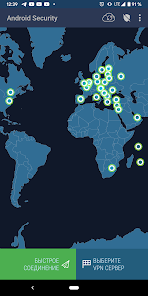
Android Security VPN is a free project for Android users. Google Play lists ads and in-app purchases; check current terms before choosing a paid option. It provides a VPN connection for everyday internet use, including public Wi-Fi. Install the app using the Google Play link on this website and review the Privacy Policy before using it.
A VPN protects the connection between your device and the VPN server. It does not guarantee anonymity or protect against every online threat.
Android Security VPN — бесплатный проект для пользователей Android. Google Play указывает рекламу и покупки внутри приложения; проверяйте условия перед выбором платной опции. Он предоставляет VPN-соединение для повседневного использования интернета, включая публичный Wi-Fi. Установить приложение можно по ссылке Google Play на этом сайте. Перед использованием ознакомьтесь с политикой конфиденциальности.
VPN защищает соединение между устройством и VPN-сервером. Он не гарантирует анонимность и не защищает от всех интернет-угроз.
Start with a connection check, diagnose failures and understand what a VPN protects. Each guide includes English and Russian instructions.
Практические инструкции подключения, диагностики и защиты в общих сетях. В каждом руководстве есть русская версия.
Install, connect and check your VPN connection on Android.
Distinguish network, VPN and website problems with repeatable checks.
A practical workflow for shared networks, with clear limits of VPN protection.
Project identity, app terms, real app screenshot and support contact.
Android Security VPN focuses on the essential protections people expect from a mobile VPN: privacy, encrypted access, simple controls, and quick connection flow.
Help protect your internet traffic from exposure when you connect from mobile networks, cafés, airports, hotels, or other shared networks.
Keep your online activity more private by routing your connection through VPN infrastructure instead of exposing your direct network path.
Open the app, connect, and continue using your Android device with a straightforward VPN workflow made for daily use.
The app is distributed through Google Play, so installation, updates, and app management fit the standard Android experience.
Use VPN protection when connecting to networks you do not control, including open hotspots and shared guest networks.
This website is a lightweight landing page with a direct link to the Android Security VPN listing on Google Play.
Quick start
Android Security VPN is built around a simple mobile flow. Use the Google Play link when you are ready to install the app and manage it like any other Android application.
Phones are always connected: messaging, banking, browsing, work apps, travel, and public Wi-Fi all happen from one device. A VPN adds a practical protection layer for everyday Android use.
A VPN helps reduce what local networks can observe about your traffic path when you are connected through shared infrastructure.
A VPN changes the network path, but signed-in accounts, cookies and information you share can still identify you. Read our public Wi-Fi guide for practical limits.
Turn on VPN protection when working remotely, using public hotspots, checking accounts, or browsing away from trusted networks.
Here are the basics before you continue to Google Play.
No. The page stays here. Use the Google Play button when you want to open the Android Security VPN app listing.
Yes. The Google Play listing is for the Android Security VPN app package com.androidsecurity.vpn.
Use VPN protection when privacy matters, especially on public Wi-Fi, travel networks, shared networks, or any connection you do not fully trust.
Install the app from Google Play using the official app page linked from this website.
Install Android Security VPN from the official Google Play page when you are ready.